Field note · Platform engineering
What breaks when you actually try to provision a Mac from scratch#
The Apple Business + Entra + Nix diagram was clean. The first wiped Mac reminded me of everything a diagram doesn’t show: PKG format, appstored, incomplete claims, missing Homebrew, and the wrong Nix source.

Series Nix, Entra, and Apple Business · 5/5 · ← Previous
The diagram was clean.
Apple Business installs Determinate, then my Bootstrap.pkg. At first login, Entra identifies the user, the app resolves the profile, Nix builds the workstation, and everyone is happy.
Then I wiped a Mac and tried it for real.
Obviously, that’s where it gets interesting.
Seeing the package in the profile doesn’t mean it’s installed#
First trap: on the Mac side, I could clearly see the package declarations that had arrived from Apple Business.
I could have concluded the problem was elsewhere.
Looking at the logs, reality was simpler: appstored had downloaded my package fine, then installation had stopped immediately.
The message was fairly telling:
Could not create PKProduct
The file “Distribution” doesn’t exist.
The network worked. Apple Business had done its job. The file had been retrieved.
My package was just bad.
pkgbuild alone wasn’t enough#
I had built a component package with pkgbuild.
It was perfectly installable locally, so at first glance nothing shocking.
Except that on this deployment path, appstored expected a product archive with a Distribution file at the top level.
So I changed the pipeline to also go through productbuild.
Since then, the build itself verifies the contents of the final package. It expands it and fails if Distribution isn’t there.
That’s typically the kind of bug I prefer to turn into a test rather than a note in a wiki.
Otherwise, six months later, someone rebuilds the package slightly differently and we’re back reading appstored logs.
The clean Mac also showed me all my invisible dependencies#
On my workstation, Homebrew has existed for a long time.
On a freshly wiped Mac, no.
That seems obvious said that way. It’s much less so when a nix-darwin activation has worked for months on your machine and only breaks during a real ADE enrollment.
Some of my profiles still used Homebrew casks. Activation therefore landed on a system where brew simply didn’t exist.
I first added the necessary bootstrap, then I took the problem the other way: do these applications actually need to go through Homebrew?
The current compromise is cleaner. Preflight now treats Homebrew as a real dependency: if it’s missing, Setup detects it and knows how to install it in the user context. If the Command Line Tools are missing, it requests their installation first instead of letting Homebrew fail further down.
In parallel, I moved what made sense to Nix. VS Code, for example, came back on the Nix side while Edge and Office still remain casks in the relevant profile.
I much prefer that to stacking a script hidden in a postinstall just because my development machine had masked the problem.
Entra worked, but I was still missing a piece of information#
Another more subtle bug: Entra login succeeded, the App Role was correct, and the right workstation profile was chosen.
Yet some user customizations didn’t arrive.
The problem came from the email.
The role doesn’t depend on email, and I want it to stay that way. On the other hand, my Nix inventory still uses the address to attach certain known personal modules.
I had assumed preferred_username would always be available.
That wasn’t robust enough.
So I added the necessary fallbacks and, above all, made that data mandatory when the build needs it. If the app can’t correctly identify the user to attach their customizations, it mustn’t continue silently with a half-good workstation.
It’s a detail, but it illustrates well the difference between “auth works” and “I have all the data needed to build the machine correctly.”
I managed to clone the right config… then not use it#
That one made me laugh.
On a Tech profile, the GitHub Device Flow worked. The mdm-setup repository was cloned into the user home.
And then the Nix engine kept building from the snapshot embedded in the Bootstrap.pkg.
So the whole GitHub journey was correct, the repo was right there, but the latest changes were never used.
The Mac conscientiously built the wrong version.
I fixed source resolution to prefer the user checkout when it exists, then fall back to the bootstrap snapshot.
It works for the pilot, but it’s exactly the kind of situation that convinced me to move toward explicit, prebuilt releases: I prefer a version to be chosen deliberately rather than “the freshest source we found somewhere on disk.”
And some apps simply weren’t where I was looking for them#
Home Manager adds another small surprise: some user applications land in ~/Applications/Home Manager Apps/, not in /Applications.
Provisioning said success.
I looked in /Applications.
I didn’t see what I expected.
It looks like a failure even though the system did exactly what it was asked.
Since then, I also treat that kind of information as part of diagnostics. If the bootstrap installs something in a non-obvious place, it should be able to explain it.
That’s much cheaper than rediscovering the behavior on every ticket.
“nix exists” also isn’t synonymous with “Determinate is ready”#
Another first-login race: the binary can be present while the environment isn’t fully operational yet.
At first, my preflight was too optimistic.
I roughly checked that Nix existed.
Now I want to know that the daemon actually responds and that the store is usable before launching the rest.
Same thing for the network: a connected Wi-Fi interface behind a captive portal isn’t usable Internet access for MSAL.
That part is now explicit in preflight. The app waits for a usable path, checks the captive portal, then actually tests the Microsoft endpoint before opening Entra. If it doesn’t pass, it waits and retries with backoff instead of stacking auth windows.
I much prefer that to turning a network problem into a fake identity incident.
macOS also reminded me that root isn’t all-powerful#
During the first deployment, nix-darwin activation hit an access refusal on system files even though the helper had the expected privileges.
I didn’t have a Nix syntax problem: I was simply discovering another layer of macOS protections that has to be accounted for from provisioning. The pilot let me fix the prerequisite order and limit authorizations to the components that actually need them.
It’s a good example of what an architecture diagram easily hides: being an administrator doesn’t exempt you from understanding the system’s security model, and a manual fix on a test Mac isn’t a deployment strategy.
Even nix-store --export cost me a bit of time#
When I started producing closures for the registry, I thought the export part would be almost trivial.
The classic:
nix-store -qR "$TOPLEVEL" | nix-store --exportnevertheless gave me an empty result with my Determinate install.
The problem came from the behavior of the nix-store provided in that environment: paths passed on stdin weren’t consumed the way I expected.
I ended up passing store paths as arguments, in batches:
nix-store -qR "$TOPLEVEL" \
  | xargs -n 50 nix-store --export
It isn’t a big architecture problem. It’s exactly the kind of small detail that costs you an hour while the whole surrounding model is correct.
The fix is now directly in the release script. And it reinforced again the idea that the pipeline itself must produce the closures, hashes, and manifests. I don’t want to ask every Mac to rediscover these subtleties.
A private registry also adds its own failures#
The first Blob access reminded me of something else: “the user is signed in to Entra” doesn’t mean “they automatically have a valid token for Azure Storage.”
Setup must obtain a second MSAL token for the Storage resource, and the account must have the Storage Blob Data Reader RBAC on the private container.
So I had to properly handle the case where the scope still needs consent, where RBAC isn’t present, or where the Blob responds 401/403.
I prefer that kind of explicit failure to a public container or a long-lived SAS hidden in the app. And the embedded fallback keeps a provisioning path even if the remote registry isn’t available.
And even observability can get too chatty#
The first OTEL wiring worked, but I quickly saw another classic: it’s very easy to produce far too much telemetry simply because you can.
I didn’t want a span on every agent tick, or an event for every download percentage.
So I reduced the noise: heartbeat and health on the metrics side, structured events on the Loki side, traces only for operations that have a real beginning and end. Download progress is sampled, and highly dynamic states aren’t turned into Prometheus labels.
The dashboard became much more readable after that pass.
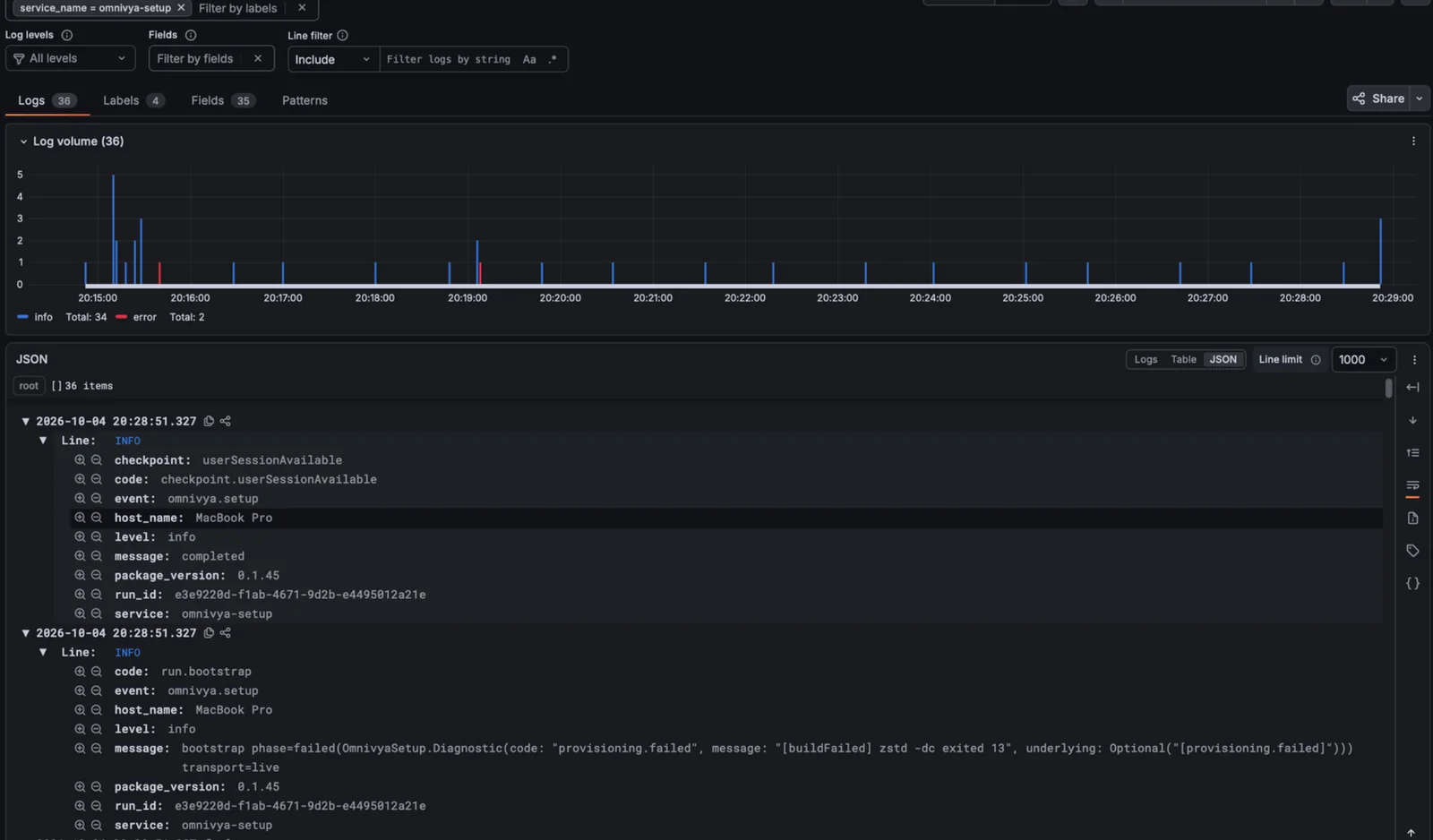
When the journey breaks, the same run stays actionable in Loki: code, run_id, package version, and provisioning error are structured.
It’s a detail that amuses me because it summarizes the whole project fairly well: the problem is almost never “succeeding at collecting more.” The problem is deciding which information actually deserves to exist.
Disk remains the next obvious trap#
If I distribute prebuilt Nix closures tomorrow, I don’t want to turn 512 GB SSDs into a historical archive of the fleet.
I’ll keep the current generation and the previous-known-good. An older generation doesn’t deserve to stay only “just in case,” especially if rollback is already covered by the previous one.
But GC must only happen after validation of the new generation. Otherwise, you can very easily delete the only rollback that would have been useful.
A recovery UI I can finally show#
At first, a lot of resume logic existed mostly in the code.
It’s now visible.
Preflight shows its gates, provisioning shows the Build / Install / Activate / Validate steps, and on failure the app shows the checkpoints already passed as well as the exact place where Try Again will resume.
The Done screen has also become a real little dashboard with Entra, GitHub, helper, MDM, bootstrap, macOS, Nix, and Homebrew state.
I find that much more interesting than a simple green “success” screen. The system is starting to be able to explain its own state.
In the end, none of these bugs changed the architecture#
That’s probably what I find most interesting.
Apple Business had delivered the declaration.
appstored had downloaded the package.
PackageKit refused its format.
Entra had authenticated the user.
The App Role was good.
My customization logic expected another piece of data.
GitHub had cloned the repository.
Nix worked.
My engine had simply chosen the wrong source.
Each time, the problem was fairly localized because responsibilities were separated.
That’s exactly what I wanted to achieve.
A full erase remains indispensable, but it isn’t the only real test#
After a few iterations, I stopped treating a local test as representative.
Deleting two files then relaunching the app isn’t a provisioning test.
For the ADE path, the real test remains a wiped Mac, Setup Assistant, a clean first login, the real network, no dependencies inherited from my development environment, and a user who doesn’t know the implementation.
But the reverse is true too.
I don’t want to validate only the comfortable blank-disk case while several company machines already exist.
A brownfield machine is almost a better convergence test: Homebrew is already there, user files exist, Nix may already have been installed, the hostname has a history, and I’m not allowed to resolve a conflict by simply deleting what bothers me.
The system must therefore succeed at two different exercises.
On a new Mac, it must cleanly build the workstation from scratch.
On an existing Mac, it must understand enough of what it finds to converge it without breaking data or pretending it went through ADE when it didn’t.
In both cases, I want to end with the same thing: an identified profile, a known version, observable state, and a rollback path.
That’s where you see whether the system actually manages workstations.
Or whether it only knows how to work on the machine of the person who wrote it.
For now, that’s probably the most useful lesson from the whole effort.
Official sources#
Omnivya is the company I co-founded with Taous, and where I serve as CTO. Structured engagements run through it.
For a question or a conversation without a sales brief: Get in touch · LinkedIn