Architecture decision · Software supply chain
I version my workstations like software#
A workstation shouldn’t simply be “on the latest Git config.” I now treat the workstation as a versioned artifact: private registry, SemVer, provenance, Nix closures, and rollback.

Series Nix, Entra, and Apple Business · 4/5 · ← Previous
There’s something I find odd about workstation management.
For a service, an image, or an application in production, you want to know exactly which version is running. You want to be able to find the commit, reproduce the build, and roll back if necessary.
For a laptop, people still very easily accept “they did a git pull yesterday, normally.”
I don’t much like that difference.
If the workstation is an important work platform, I want to know what I deployed on it.
I started with the Bootstrap.pkg#
The first easy thing to version was the package itself.
Today, the build produces an artifact named with its version and source commit, then embeds a small provenance file. When I diagnose a Mac, I can therefore find the package version, the app version, the embedded mdm-setup revision, and the build date.
It isn’t very sophisticated, but it already answers a question that quickly becomes painful without it: what did this machine actually receive?
The declared version isn’t enough; I want the actually observed state#
Putting 2.7.0 in a manifest doesn’t help much if the Mac can’t tell me what it’s really running.
So I started by making observed state concrete even before I finished the whole remote SemVer machinery.
The end dashboard now collects the Bootstrap.pkg and app versions, the embedded commit, macOS, the active Nix system, the logical closure size as a number of store paths, binaries exposed on PATH, Homebrew, live MDM state, and Entra/GitHub/helper health.
That gives something much more useful than a simple “provisioning succeeded.”
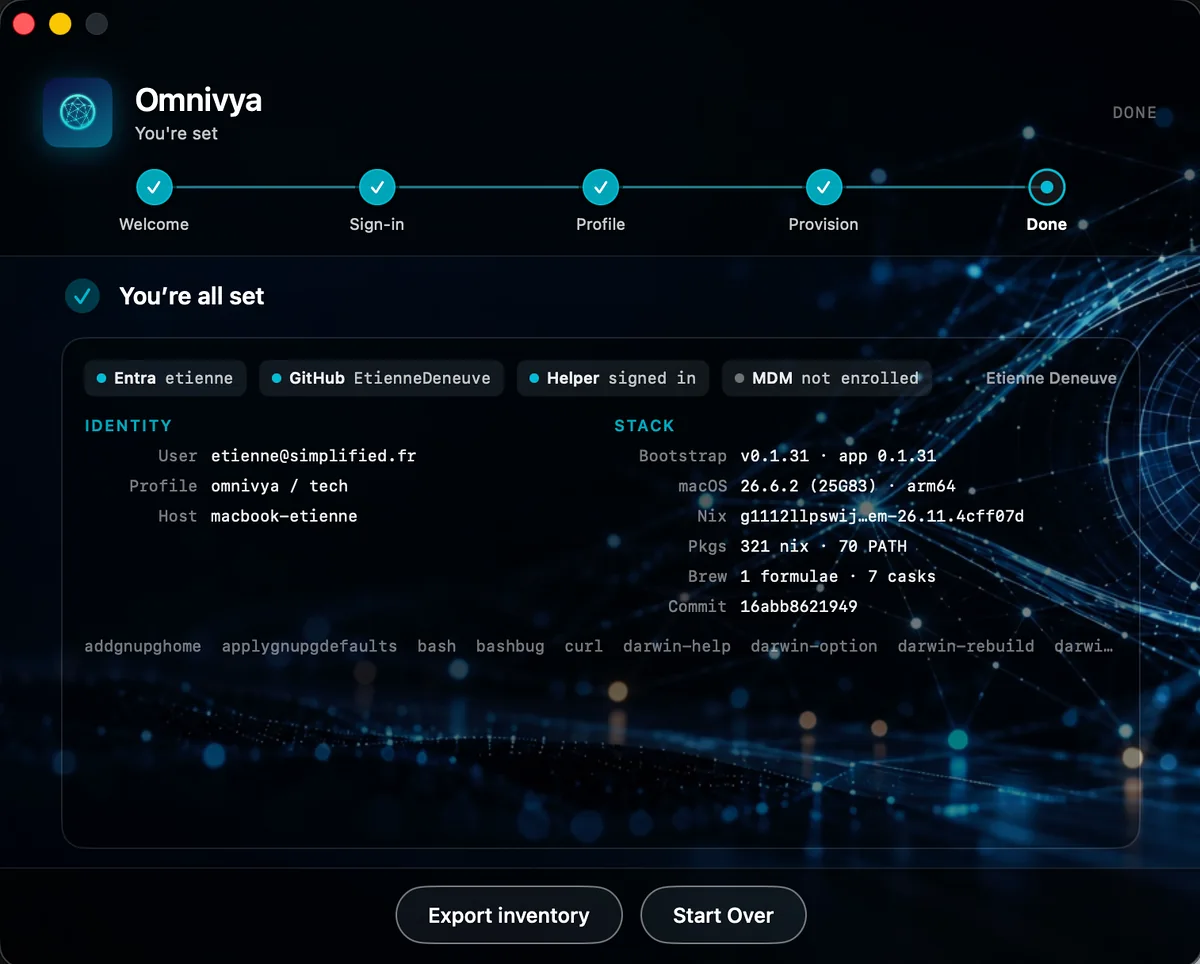
Observed state is visible locally: identity, management mode, bootstrap versions, macOS, Nix system, Homebrew, and source commit.
I still keep the distinction between what is observed and what is declared.
Since the first trials, the declared part has started to exist for real: Setup now resolves a channel, a version, a manifest, and a profile.json from the private registry. That information is attached to the provisioning run and cached locally.
I still have to go all the way to the current / previous-known-good model and automatic drift, but I’m no longer only drawing the format on a whiteboard.
I’m also thinking of exposing exactly the same model on the CLI:
omnivya-nix status
omnivya-nix doctor
omnivya-nix inventory
with JSON output usable by the app. I don’t want different diagnostic logic between the SwiftUI button and the terminal.
For installed software, I still don’t want to display a list of 800 store paths on the main screen.
The current implementation deliberately stays simpler: number of paths in the closure, number of exposed binaries, a few examples, number of Homebrew formulae and casks. The full snapshot is exportable as JSON for support.
The next step will be to cross that with the release inventory generated at build time to answer a more interesting question: not only “what do I see on this machine?”, but also “is this really what this release was supposed to contain?”
That’s what will gradually turn the current snapshot into a compliance check rather than a simple inventory.
As long as I know that state, I might as well ship it upstream#
From the moment the workstation can say precisely what it is, keeping that information only locally was a bit of a waste.
So I wired a first OpenTelemetry pipeline for the pilot.
And I still haven’t installed Alloy on every Mac.
The agent I had already written emits OTLP/HTTP directly. On my Mac, a central collector receives the signals and routes them to Prometheus, Loki, and Tempo, then Grafana displays fleet state.
Omnivya Workstation Agent
        |
        | OTLP/HTTP
        v
OTel Collector
        |
        +--> Prometheus
        +--> Loki
        +--> Tempo
        |
        v
Grafana
For now, it’s deliberately a lab: the collector runs on my Mac and the pilot machines reach it on the LAN or Tailscale. I’m keeping Entra auth in front of the collector for the next step, when I leave this local setup.
The interesting point is mainly that the instrumentation already exists on the endpoint. Changing the backend later shouldn’t require rewriting the app.
The agent currently ships a heartbeat, helper and XPC health, Entra and GitHub state, enrollment mode, and some inventory information. Interactive Setup, for its part, sends its end-to-end traces, structured logs, and registry artifact download progress.
I also did a pass to avoid high-cardinality metrics. Dynamic states stay in wide-event JSON logs; Prometheus metrics keep stable labels, mainly the host and the few dimensions that are actually useful.
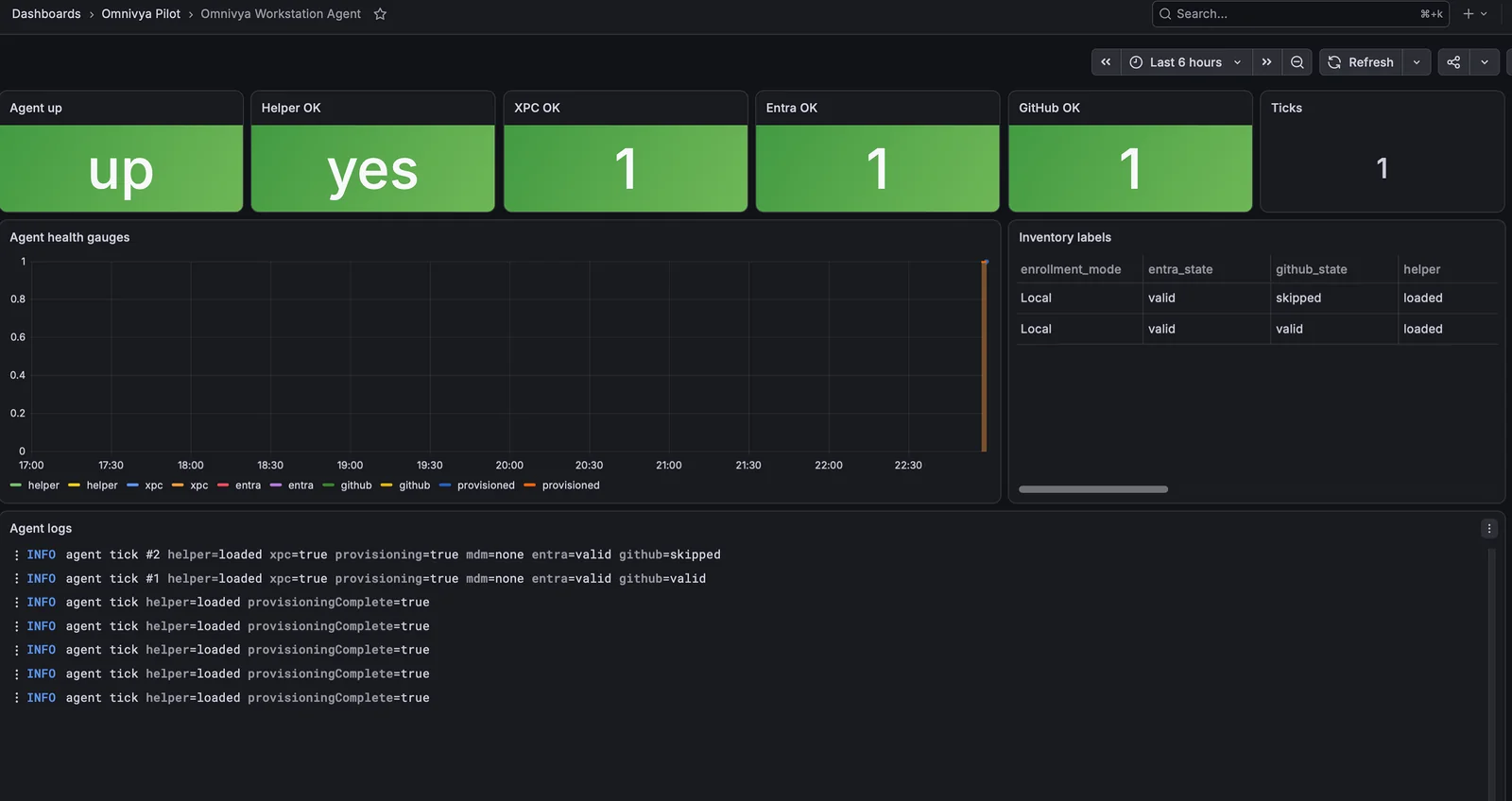
The pilot’s first Grafana dashboard: agent health, helper/XPC, Entra/GitHub sessions, enrollment mode, and tick logs.
The dashboard obviously isn’t a full fleet-management console yet, but it already answers simple questions: is the agent running, is the helper responding, are credentials still valid, is the Mac in local adoption or enrolled, and when did the agent last speak.
The funniest part is that I started from a small provisioning app “for fun,” and I’m slowly starting to have a workstation control plane without really having set out to build one.
The Bootstrap is already a real release#
At the time I’m writing this, the Bootstrap itself has already reached 0.1.45, while the workstation registry has started its own cycle at 0.1.0.
Each version is published on an immutable Blob path, with its SHA-256, its signed package, and its provenance. I never silently replace a file behind the same URL.
That forced me fairly early to apply the same reflexes to the workstation as to a software artifact: a given version must point to a given content.
The Nix configuration must now follow the same logic, but with its own SemVer cycle. I specifically don’t want to confuse “bootstrap version” and “workstation version.”
I prefer SemVer to “stable”#
I had started talking about stable and pilot channels, then realized that wasn’t enough.
A channel says who gets a release.
It doesn’t say what that release is.
So I prefer to give the workstation configuration itself a real version: 2.6.1, 2.7.0-pilot.1, 2.7.0, and so on.
The channel remains useful for deciding that a small group can see prereleases while the rest of the fleet stays on the latest stable.
But the release itself keeps its own identity.
And I obviously keep the exact SHA behind the version. SemVer is convenient for talking among humans; the commit remains the technical provenance.
The private registry is running now#
To move fast, the first pilot built from the Nix snapshot embedded in the package, or from the Git checkout on Tech workstations.
That was useful to validate the chain, but I didn’t want to make it the distribution model.
Since then, I’ve wired a real profile registry in Azure Blob. The container is private and Setup accesses it with an Entra token dedicated to Azure Storage. No SAS in the application, no anonymous read.
The layout stays deliberately simple:
workstation-profiles/
  channels/
    pilot/
      tech.json
      direction.json
      standard.json

  releases/
    0.1.0/
      tech/
        manifest.json
        aarch64-darwin/
          profile.json
          closure.nar.zst
The channel pointer says which version to look at. The manifest describes the artifacts. The profile.json contains the role, the store path, and a few metadata fields needed for activation.
The 0.1.0 pilot channel is already published and resolved by the app after Entra auth.
The Mac can now consume a prebuilt closure#
The import path is wired up too.
When a release actually contains closure.nar.zst, Setup downloads it into its cache, verifies its SHA-256, then passes the helper the closure path and the expected store path.
The helper then does:
closure.nar.zst
   -> zstd
   -> nix-store --import
   -> set profile
   -> activate
   -> validate
If the registry doesn’t contain the closure yet, the engine keeps the local build as a fallback. That lets me migrate gradually without breaking the pilot.
At the time I’m writing these lines, the live registry already contains the manifests and profile.json files. The NAR export/import path is implemented, and I specifically had to fix the publish script because Determinate’s nix-store --export didn’t consume my paths on stdin the way I had assumed. Export now passes store paths as arguments before zstd compression.
I’m still validating the first complete publication of closures on the pilot channel. I’d rather write it that way than pretend the whole supply chain is finished.
Entra replaces the static key#
The application has just authenticated the user.
So I reuse that identity to request an Azure Storage token and read the private container with RBAC. The workstation role and the right to read the Blob remain two distinct controls.
That’s exactly what I wanted: Git remains the source, Azure distributes the releases, but no storage secret is embedded in the Mac.
One security point remains that I deliberately haven’t papered over: the pilot still accepts unsigned manifests. The Ed25519 verifier exists as a skeleton, but enforcement isn’t activated yet.
The next target state is therefore:
Entra/RBAC
   -> who can read

Ed25519
   -> which manifest the helper accepts applying
Two different problems, two different controls.
I also want to know the disk cost before downloading#
That’s where the topic becomes more concrete.
A Nix closure isn’t necessarily small. On a 512 GB Mac, downloading several full generations without a retention strategy can get stupid fairly quickly.
The manifest must therefore contain enough information for the app to know before download whether the update is reasonable: compressed size, closure size, minimum bootstrap version, minimum macOS version, artifact digest.
No need for a huge protocol. Just enough to avoid discovering at 95% of the download that you’re short 20 GB.
And above all, keep a real rollback#
I always want to be able to go back to the last generation known as good.
The policy I’ve settled on is therefore fairly simple: keep the current version and the previous-known-good. The rest can become eligible for garbage collection once the new version has been activated and validated.
I especially don’t want to launch an aggressive GC before that validation.
Otherwise, you turn the rollback mechanism into decoration.
That’s also why I prefer the application to know the applied versions and protected store paths rather than leaving a Nix cron to clean up on its own in a corner.
At heart, this looks a lot like a software supply chain#
That’s probably the point that interests me most in all of this.
I’m not trying to build a “super MDM.” I’m mainly trying to treat the workstation as an artifact I can build, identify, verify, deploy, and roll back.
The source stays in Git.
The build produces something precise.
Storage distributes.
Entra authorizes.
The application orchestrates.
Nix applies.
And if it breaks, I know which version I’m trying to land and which one I can go back to.
That seems much healthier to me than “rerun the update script and see if it passes.”
The theory is fairly pretty. Obviously, the first Mac I actually wiped quickly reminded me that between the diagram and the machine there is appstored, PackageKit, incomplete Entra claims, Homebrew that doesn’t exist, and a few other charming details.
That’s the last part.
Official sources#
Omnivya is the company I co-founded with Taous, and where I serve as CTO. Structured engagements run through it.
For a question or a conversation without a sales brief: Get in touch · LinkedIn