Field note · Platform engineering
Why I ended up writing a small macOS app to provision my workstations#
First login mixes network, identity, root privileges, Nix, and error recovery. At some point, continuing in shell was more complicated than writing a small SwiftUI app with a real state machine.

Series Nix, Entra, and Apple Business · 3/5 · ← Previous
At first, I really thought I could handle first login with a few scripts.
On paper, you had to check that Nix was there, recover the user, do an authentication, build the config, launch nix-darwin, and done.
Obviously, the real list was a bit less pretty.
You had to wait for a real graphical session, know whether Determinate was actually ready, handle Entra, optionally GitHub, build Nix in the right user context, activate as root, resume after a crash, explain what’s happening on screen, and above all avoid a retry relaunching anything in any state.
At that point, continuing in shell would just have produced an application… without a UI and without a real state machine.
So I stopped fighting the problem and wrote a small macOS app.
SwiftUI was the most mundane choice#
The project is deliberately classic: Swift 6, SwiftUI, Xcode, and XcodeGen.
I had no desire to add Electron or a webview for an application that has to talk to macOS, Keychain, MSAL, launchd, and a privileged helper.
The app is small and tightly tied to the system. SwiftUI is more than enough.
I also keep the build usable from the command line with xcodebuild. Xcode is there when I need it for previews, debugging, or signing, but I don’t want the release to depend on a series of clicks in the IDE.
The real value isn’t the interface#
The interface could be ugly and the model would still be interesting.
What interests me most is that the journey is finally explicit.
There’s a preflight state, an Entra authentication state, a resolved profile, optionally a GitHub step, then provisioning, validation, and the end.
A failure is also a state.
It sounds trivial, but it changes a lot. When the Mac reboots in the middle, when the app is force-quit, or when a Nix activation fails, I can decide precisely what is replayable and what isn’t.
Before, that kind of logic quickly ends up in marker files, a few ifs, a sleep 10, and a lot of hope.
Here, the transitions are tested and the run keeps checkpoints.
I didn’t want to run the UI as root#
Another point that became obvious quickly: the graphical application must not have the privileges needed to modify the system.
So I separated the app and a privileged helper.
I especially didn’t want an endpoint like run(command).
The helper exposes a small protocol with known operations: preflight, device preparation, build, activation, validation, rollback, status.
That makes the boundary much clearer. The app requests an operation. The helper decides how to carry it out with the necessary privileges.
It’s much healthier than a root shell remote-controlled from the UI.
User context really matters with Nix#
Build and activation don’t live in exactly the same place.
The build needs to know the right user, their home, Home Manager, and optionally their Git checkout. System activation, for its part, needs root.
At first, I therefore systematically built in the user context then activated on the helper side.
Since then, the engine also knows another path: if the Entra registry provides a prebuilt and verified Nix closure, Setup materializes it in its cache, then the helper imports it directly into the store before activation. If the artifact doesn’t exist yet, I keep the local build path as a fallback.
registry artifact available
   -> download
   -> SHA-256
   -> nix-store --import
   -> activate

otherwise
   -> local nix build
   -> activate
That also avoids depending on a sudo prompt that would appear more or less well in the middle of first login. And above all, the state machine doesn’t change: only the implementation of the provisioning step evolves.
That kind of detail isn’t spectacular, but it’s precisely what makes provisioning reproducible instead of only working on my Mac.
GitHub only shows up when it’s useful#
For a Standard or Leadership profile, I have no reason to impose GitHub.
For a Tech profile, my current implementation can launch a Device Flow then clone mdm-setup into the user workspace.
This point has started to move since the first runs.
The private registry is now wired up, and the helper knows how to import a prebuilt closure when one is available. GitHub therefore no longer needs to be the workstation distribution mechanism.
I still keep it for the Tech profile because a developer will work with repositories anyway. The Device Flow then remains a real developer onboarding step, not an artificial dependency imposed on every workstation.
First login is much less stable than it looks#
The pilot reminded me of something fairly simple: seeing the desktop doesn’t mean the machine is ready.
Setup Assistant can finish while Determinate isn’t fully operational yet. Wi-Fi can be connected but blocked by a captive portal. The helper may not be loaded. And on a clean Mac, the Command Line Tools or Homebrew may simply not exist.
So I ended up making preflight visible instead of hiding all of that behind a spinner.
Today the app walks through a small checklist: Determinate, Apple Command Line Tools, Homebrew, ADE enrollment or local adoption, network, then presence of the configuration. If Homebrew is missing, Setup knows how to install it in the user context. If the CLTs are missing, it first opens the Apple mechanism meant to install them.
The network part also became a real gate. I check the path, a possible captive portal, and reachability of the Microsoft endpoint before launching MSAL, with a bounded retry. That avoids turning a Wi-Fi problem into a fake Entra incident.
It isn’t very spectacular technically, but it’s much nicer to operate: the user sees what the machine is actually waiting for instead of watching a spinner.
I also stopped making the whole window jump around#
The first attempts had another very mundane flaw: as screens changed, buttons and progress could end up too low or make the window size vary.
I ended up treating the app as a real assistant: fixed header, Welcome → Sign-in → Profile → Provision → Done progress, centrally scrollable content when needed, actions always visible in the footer.
It isn’t the most “architecture” piece of the project, but it matters enormously during onboarding. A Retry button you have to find by resizing the window isn’t really a recovery mechanism.
And when a step breaks, the error screen now shows the checkpoints already validated and the next step Retry will resume. There too, the state machine becomes visible to the user instead of remaining an internal detail.
I ended up showing Nix logs in the app#
I don’t much like progress bars that say “preparing…” for ten minutes.
The Nix build already provides a lot of information, so I might as well use it.
The app shows progress, the Build / Install / Activate / Validate steps, and a bit of the log. That’s also what interested me about a real UI: seeing where the machine is without having to tail three files from another terminal.
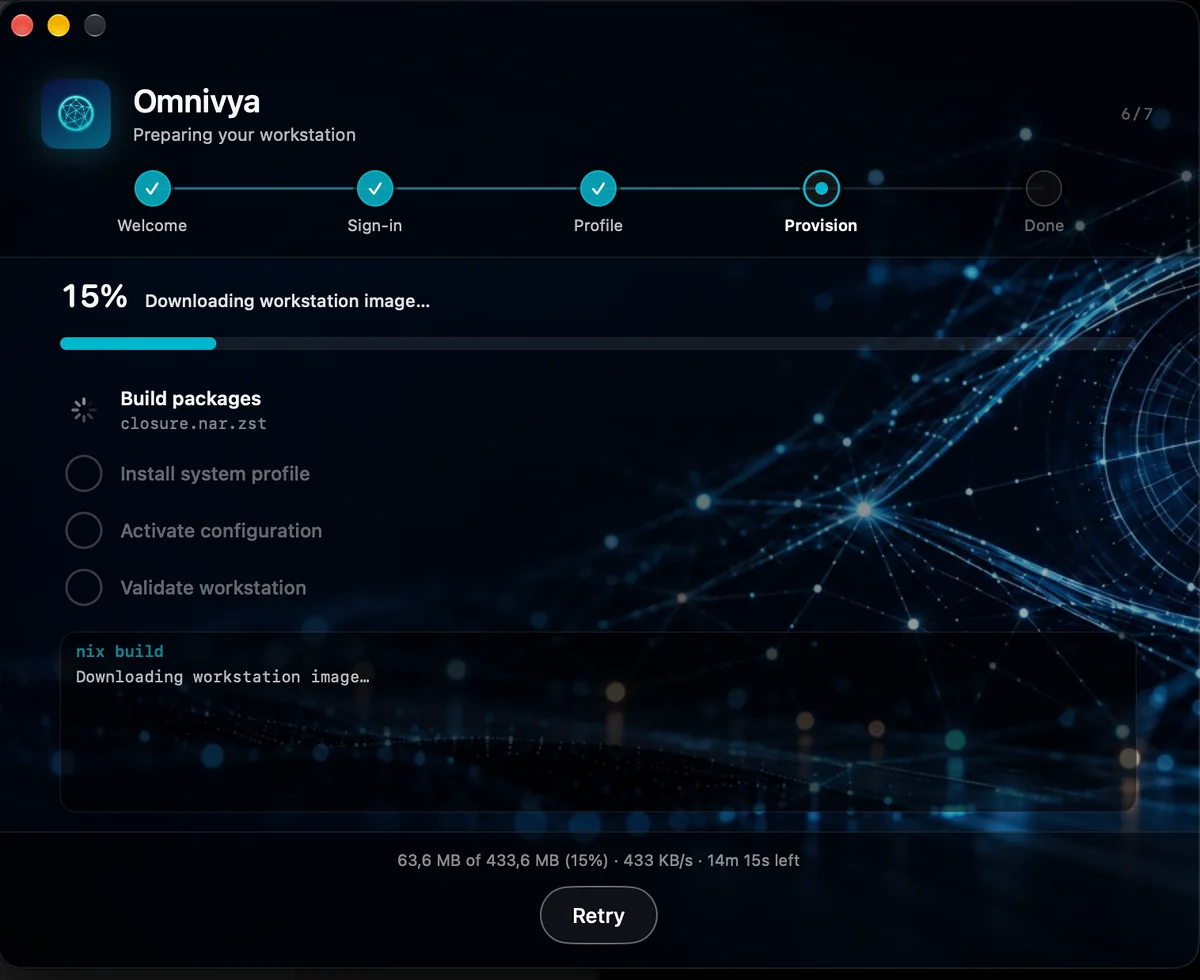
Provisioning stays visible: Setup downloads the prebuilt closure, shows throughput and progress before import and activation.
On failure, you can retry, export diagnostics, and, when it makes sense, rollback.
For me, that fully belongs to the Platform Engineering topic.
A golden path that only works when everything goes well isn’t really a golden path. What also matters is what it tells you when something breaks.
The same app must also know how to pick up an already-used Mac#
That also saves me from creating a second tool for machines that already exist.
On a new Mac, the app knows it arrives just after bootstrap and can walk through its onboarding.
On a Mac that has already lived, it has to be a bit less naïve.
Before touching anything, it can look at what already exists: Nix, Homebrew, a possible nix-darwin generation, bootstrap versions, disk space, files Home Manager might take over, and the Mac’s management state.
The Entra role doesn’t change. Neither does the target profile.
What changes is how you get there.
I want that first “brownfield” apply to show what it’s going to do before doing it. No need to produce a 4,000-line Nix diff, but at least say clearly that the machine will join the Tech profile, which important components will be added, whether a conflict was detected, and whether an existing dependency needs intervention.
Only then does it converge toward the same state a fresh install would have produced.
That ultimately gives two entry points to the same workstation:
New Mac
  -> ADE
  -> Bootstrap
  -> Setup

Existing Mac
  -> Manual Bootstrap
  -> local audit
  -> Setup

then in both cases
  -> Entra
  -> profile
  -> Nix
  -> same versioned state
I much prefer that to maintaining an “old fleet” alongside the new one for months.
I ended up instrumenting the journey itself#
Because the state machine was already explicit, OpenTelemetry instrumentation became fairly natural.
Interactive Setup now emits an end-to-end trace for a full run, with the main phases as spans: preflight, Entra, role resolution, GitHub, provisioning, and validation. Inside provisioning, I also distinguish local build, registry download, closure import, and activation.
I didn’t want to turn every progress tick into a span. Checkpoints and download progress are therefore events on the open spans, and logs go out as wide JSON events to Loki.
That gives something much more readable than a flood of tiny spans.
omnivya.setup.run
  -> preflight
  -> entra
  -> role
  -> github
  -> provisioning
       -> registry.download
       -> registry.import
       -> nix.activate
  -> validate
The same run_id is reused if Setup is relaunched after a crash, so workflow resume stays correlatable in Tempo instead of creating a second story with no link to the first.
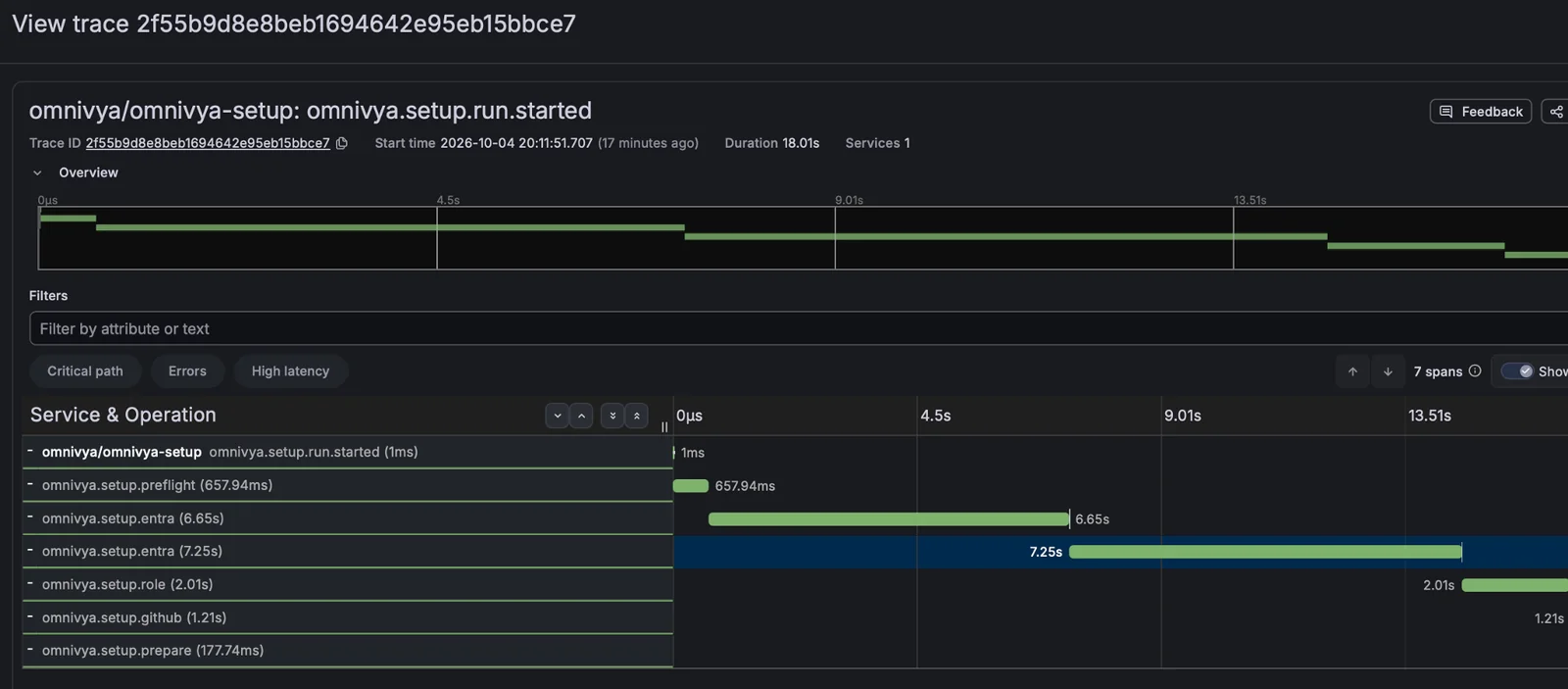
The interactive journey is traced end to end: preflight, Entra, role, GitHub, then provisioning stay correlated in the same run.
The app no longer disappears after first boot#
At first I mostly saw Omnivya Setup as the first-login assistant.
That isn’t really the case anymore.
The package now installs a persistent LaunchAgent. As long as provisioning isn’t finished, it keeps the interactive path. Once the machine is configured, the same component can run in --agent mode, without a window and without triggering interactive Entra or GitHub login.
On the pilot, I deliberately set it to 15 minutes to see changes quickly in Grafana. The normal target will come back toward a few hours once the chain is validated.
Once the workstation is built, I still need to answer very simple questions: which Bootstrap.pkg version is installed, which app version is running, which Nix is actually available, which workstation configuration is active, which commit produced it, and what I can roll back to.
The package embeds its provenance, the helper exposes its state, and the agent now writes a periodic snapshot. The final screen already gathers a good part of that information:
Omnivya Workstation

Bootstrap      <version>
Setup.app      <version>
Helper         connected / protocol 2
Nix            <active system>

Profile        tech / stable
Configuration  2.7.0
Source         <commit>
System         /nix/store/...
Previous       2.6.1

Last check     2 h ago
Status         up to date
The end dashboard is no longer just an idea. It already collects bootstrap provenance, macOS, the active Nix system, the number of closure paths, exposed binaries, Homebrew formulae/casks, live MDM state, plus Entra, GitHub, and helper health. All of it can also be exported as JSON for diagnostics.
It isn’t a full SBOM yet, and I don’t want to sell it as one. It’s more of a “workstation neofetch” precise enough to know what you’re looking at.
I still wouldn’t put remote verification in the root daemon.
The privileged helper should stay dumb: read system state, activate a generation, validate, rollback. The periodic loop belongs to the user LaunchAgent. It collects state, checks sessions non-interactively, writes its snapshot, emits pilot telemetry, then exits.
That especially avoids giving user tokens or network traffic to a root process that doesn’t need them.
The app then becomes less of a “wizard you use once” and more of a small workstation control panel.
In the end, the app stays fairly small#
I’m not building a homemade MDM product.
The application mostly serves as glue between components that each have their role.
SwiftUI handles interaction. Entra identity. The helper privileges. Nix machine state. Apple Business the bootstrap.
Once that split was in place, the rest became fairly logical.
I already version my services, images, and artifacts. Why should my workstations stay on “the last Git config that managed to pass”?
Official sources#
Omnivya is the company I co-founded with Taous, and where I serve as CTO. Structured engagements run through it.
For a question or a conversation without a sales brief: Get in touch · LinkedIn