Architecture decision · Platform engineering
Apple Business to enroll, Entra to decide which workstation to build#
I didn’t want to map email addresses to profiles in a script, or ask the user which workstation they wanted. I used Entra and App Roles to make identity an input to provisioning.

Series Nix, Entra, and Apple Business · 2/5 · ← Previous
Once Apple Business was limited to its bootstrap role, a fairly basic question remained: how does the Mac know which workstation to build?
The first idea that comes to mind is to look at the email address. It’s tempting because it works quickly. You take alice@entreprise.fr, infer Alice, then a role, then a configuration.
I didn’t like that much.
An email address is handy for displaying a name, configuring Git, or attaching a few preferences. It’s not a good basis for deciding what a user is allowed to install on their workstation.
Entra already had that information, so I might as well use it.
I especially didn’t want a “choose your profile” screen#
That would have been the simplest solution on the UX side and probably the worst on the model side.
I don’t want someone to land at first login and choose between Standard, Leadership, or Tech. The profile isn’t a user preference; it’s an authorization decision.
So I created an Entra application dedicated to workstation onboarding and three App Roles: Workstation.Standard, Workstation.Direction, and Workstation.Tech.
On the Nix side, those roles map to my user, direction, and tech profiles.
The idea is very simple: the application never asks “what do you want?” It asks Entra “who are you and what are you entitled to have?”
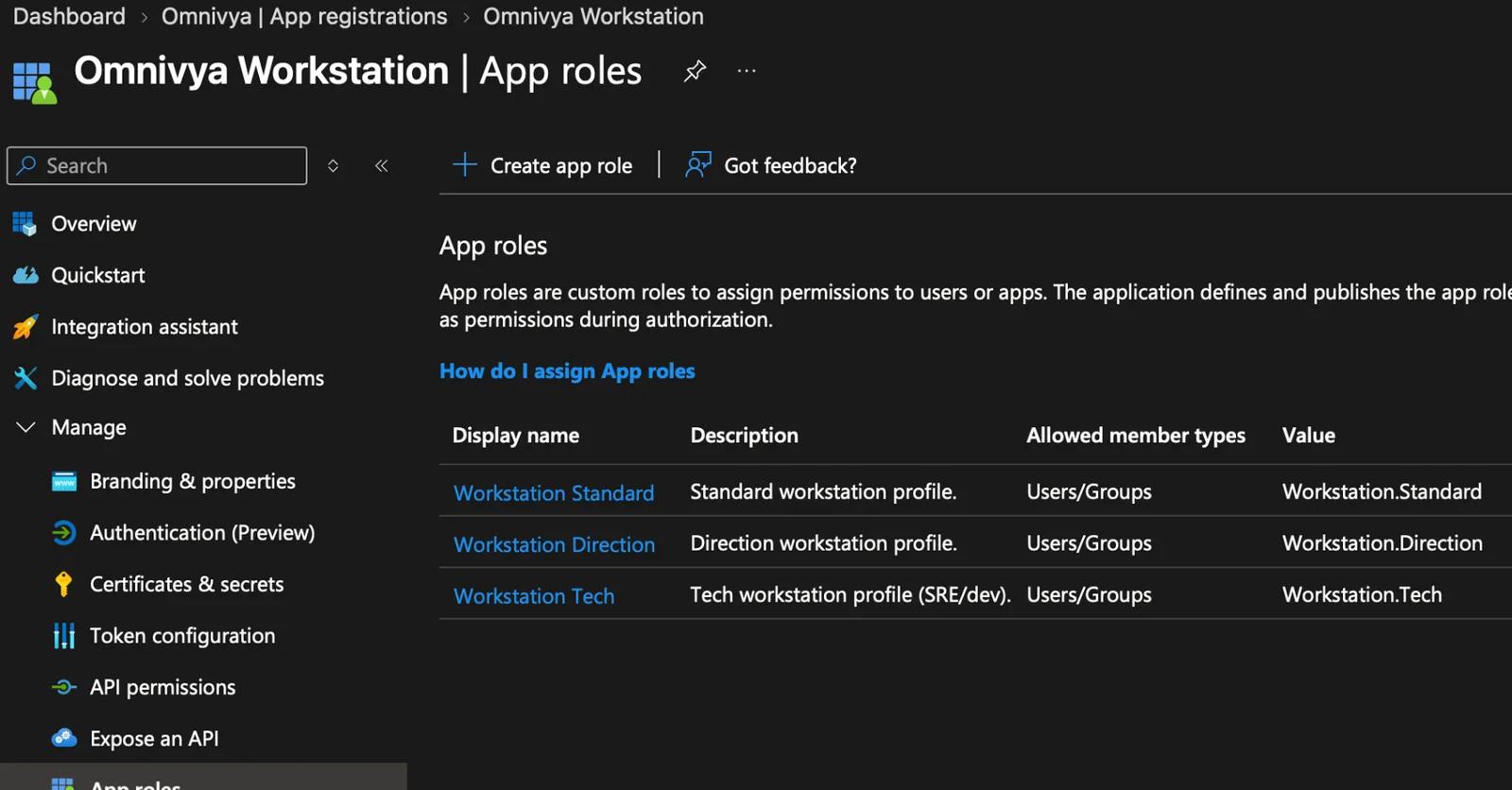
Workstation roles are an explicit contract of the Entra application, not a choice offered to the user.
The UPN stays useful, but it doesn’t decide the role#
I obviously keep the UPN and the email. They are useful.
In my case, email lets me attach a few known customizations in the Nix inventory: a particular Home Manager module, a few personal tools, that kind of thing.
But that happens after the authorization decision.
The role comes from Entra. Customizations optionally come from the known identity in the repo.
That separation also let me spot a bug fairly quickly during the pilot: the user was correctly authenticated, the App Role was right, but the claim I used to get the email wasn’t always present. The workstation therefore received the right general profile, but some customizations didn’t attach.
It’s a good reminder: a convenient claim isn’t necessarily an invariant. If I truly need it to build the workstation, I must validate it explicitly.
I come back to this in the last article, because that kind of detail is much more interesting than the perfect diagram on a slide.
An identity is not a device#
I also took the opportunity to break another historical coupling: a person is not their Mac.
Before, a known hostname almost naturally led to a user, then to a role. That works until the day someone has two machines, changes roles, or replaces their Mac.
The repository now separates identities and devices. The runtime can build a workstation with information recovered at provisioning time, without requiring that a new hostname was added to Git the day before.
That’s what mkWorkstation does.
I still keep an inventory of known machines for day-to-day operations. I simply no longer want that inventory to be a prerequisite for first boot.
Why App Roles rather than groups directly#
I could have read Entra groups and hardcoded a mapping.
That would have worked.
But a group name belongs to the organization. The workstation role belongs to the application.
So I prefer to keep an indirection layer:
Entra groups
    -> App Role Workstation.*
    -> Nix profile
If tomorrow a group changes name or the organization moves, I can adapt the assignment on the Entra side without changing the application code or the Nix logic.
It’s a small architecture detail, but I like this kind of detail: it avoids leaking the internal organization into workstation code.
What if someone has multiple roles?#
You have to decide.
In my current implementation, resolution is deterministic. You could just as well choose to reject any ambiguity.
What matters is not leaving that decision to the order of a JSON array or the luck of the token.
Authorization must be intentional.
Resume without asking to sign in again#
A fairly important detail showed up during pilot retries: authenticating the user correctly once is useless if every relaunch opens Microsoft again, then GitHub.
MSAL now first tries to silently recover a token from its cache. If the session is still valid, the journey resumes without a new window. Same thing on the GitHub side: the token kept in Keychain is reused as long as it still grants access to the expected repository.
I deliberately keep a strict rule for headless mode: the background agent never opens interactive authentication. If it doesn’t have the necessary credentials, it records the state and waits for the next pass through the app.
It looks like a UX detail, but on a recoverable workflow it’s fairly fundamental. A retry must resume a state, not replay the whole onboarding as if nothing had existed.
On Macs adopted without ADE, I also kept the hostname visible as-is. The user identity can serve to derive the logical name used by the Nix configuration without brutally renaming a machine that already has a history.
The same identity now serves to read the private profile#
Entra no longer only serves to choose the role.
Once the user is authenticated, Setup also requests an Azure Storage token to access the private workstation profile registry. There is no SAS embedded in the app, and the container isn’t public.
The split is fairly simple: the App Role answers “which profile are you entitled to receive?”, then the Storage token and RBAC answer “are you allowed to read the artifacts in this registry?”
Entra login
   -> App Role
   -> profile ID

Entra Storage token
   -> private Blob
   -> channel
   -> manifest
   -> profile.json / artifact
I like that much more than a static key hidden in the bundle. And if the Storage token or RBAC fails, Setup still doesn’t make the container public: it falls back to the baseline embedded in the Bootstrap.
The pilot still uses an unsigned manifest while I finish the Ed25519 part. Private access is therefore already real; cryptographic verification of the manifest is the next lock to close.
What the user actually sees#
Almost nothing.
They authenticate, then the application displays the detected profile.
For a Tech workstation, it indicates that GitHub will be requested next. For a Leadership or Standard workstation, it indicates that GitHub isn’t needed.
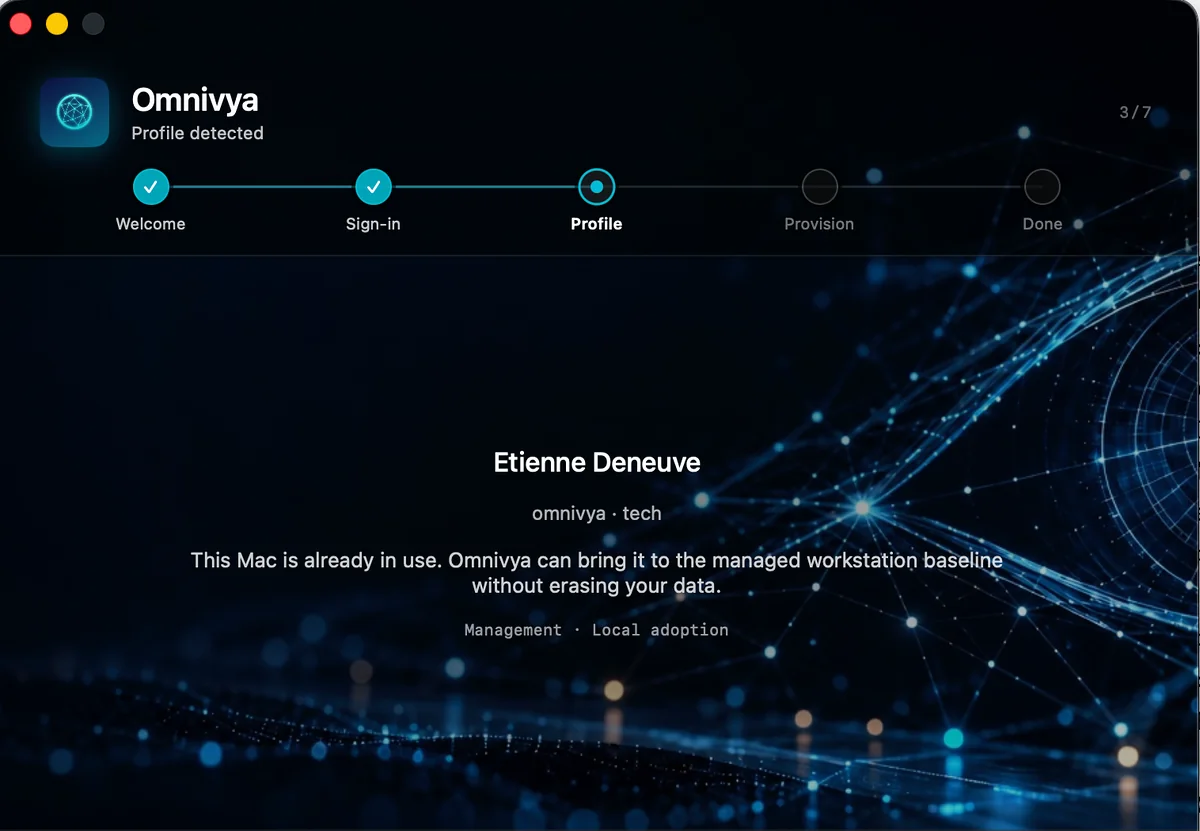
The user authenticates; Setup displays the resolved profile. The role is never selectable in the interface.
The role isn’t editable.
That was exactly what I was looking for: the journey stays very simple, but the simplicity doesn’t come from a big “trust me” button. It comes from the fact that identity already did the work.
At that point, the model was starting to get clean: Apple Business knows the Mac belongs to the fleet, Entra knows who’s in front of it, Nix knows what the profile means.
I still had to handle everything that happens between those three worlds at first login.
That’s where I stopped wanting to solve the problem with scripts.
Official sources#
Omnivya is the company I co-founded with Taous, and where I serve as CTO. Structured engagements run through it.
For a question or a conversation without a sales brief: Get in touch · LinkedIn