Architecture decision · Platform engineering
Why I stopped treating Mac provisioning as an MDM problem#
I wanted a new Mac to go from box to a truly ready workstation without turning MDM into a configuration engine. I ended up separating enrollment, identity, orchestration, and machine state.

Series Nix, Entra, and Apple Business · 1/5 · Next →
I wanted something fairly simple: a Mac comes out of its box, the user signs in, and a few minutes later they have a ready workstation.
Not “enrolled.” Not “almost ready—just three scripts left to run and two apps to install.” Ready.
Put that way, it sounds like an MDM topic. That’s how I approached it at first. You push packages, a few profiles, some scripts, add another layer for exceptions, and you end up with a system that works fine as long as you don’t look too hard at what exact state the machine is in.
The problem isn’t that MDM can’t do all of that. It’s almost the opposite: it can do enough that you’re tempted to hand it everything.
And that’s where it started to bother me.
MDM didn’t need to become my source of truth#
I already had a good chunk of my Macs managed with Nix and nix-darwin. The shell, the tools, Home Manager, roles, per-user variants: all of that already lived in a declarative model.
Recreating the same logic in Apple Business would have given me two sources of truth.
On one side, Nix says what a workstation should contain. On the other, MDM gradually pushes pieces of the same state with its own rules, its own dependencies, and its own history.
That rarely ends well.
So I kept a very simple rule: MDM enforces, Nix composes.
Apple Business stays responsible for what must be imposed from the outside: enrollment, bootstrap, security configurations, essential packages. What I don’t want is for it to know how to assemble a Tech, Leadership, or Standard workstation down to the detail of user tools.
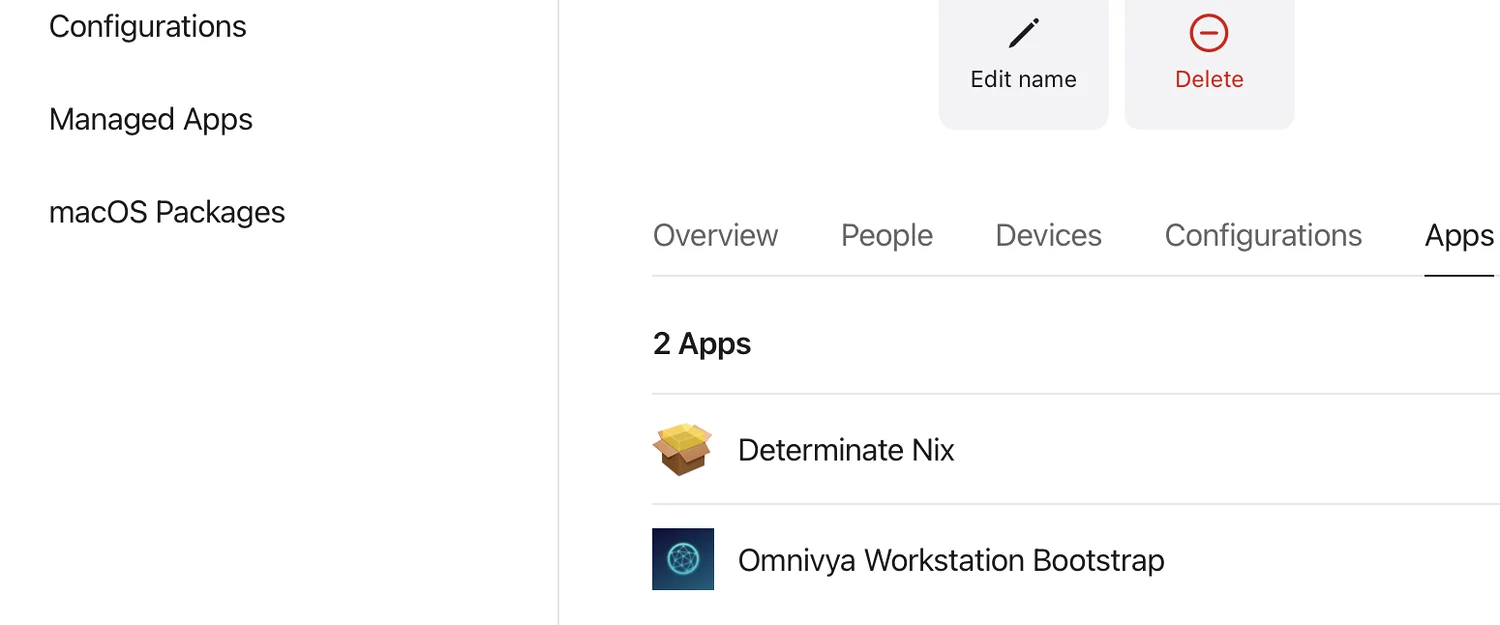
In the Blueprint’s Apps tab, there are deliberately only Determinate Nix and Omnivya Workstation Bootstrap. System permissions stay in a separate configuration.
Since the first runs, I still added a third building block to the Blueprint—but not a third provisioning layer: a very narrow configuration profile for the privileges macOS actually needs. It manages Login Items for the helper and the agent, plus Full Disk Access for the helper. The order therefore becomes more like Determinate → macOS privileges → Bootstrap.
I find the nuance important: Apple Business still enforces the workstation’s security prerequisites, but it still doesn’t describe the workstation’s contents.
It can look like a vocabulary nuance. In practice, it completely changes how you design provisioning.
The hostname had become a bad abstraction#
The old model was very classic: I had known machines in inventory and a configuration per hostname.
It looked like this:
macbook-zine
  -> user zine
  -> tech role
  -> tech configuration
For a small fleet, that isn’t absurd at all. The problem shows up when the hostname becomes the implicit key linking the person, the machine, and their role.
A user can have two Macs. A Mac can be replaced. A person can change roles. And above all, I didn’t want to open a PR just to declare a machine’s hostname before it was able to provision itself.
So I separated the three concepts.
The repository now holds known identities, known devices, and a function that builds a workstation from parameters.
Roughly:
mkWorkstation {
  hostName = "...";
  userName = "...";
  email = "...";
  org = "omnivya";
  role = "tech";
}
The result is still composed of common modules, the role, the organization, any user overrides, and a few device specifics. But first boot no longer needs the machine to already exist in inventory.
That’s much closer to what I wanted: inventory describes the known fleet; it doesn’t block a new workstation from arriving.
The split ended up becoming fairly obvious#
Once the problem was framed correctly, the responsibilities almost separated themselves.
Apple Business takes ownership of the machine and pushes the bare minimum: Determinate, the macOS privileges the helper actually needs, then my Bootstrap.pkg.
Entra first answers “who is in front of this Mac, and which profile is this person entitled to?” It now also serves to obtain an Azure Storage token to read the private profile registry.
Omnivya Setup is the glue between the two. It orchestrates first login, resolves the profile, fetches the matching release, and drives activation.
And Nix stays responsible for machine state. Depending on what the registry contains, the Mac can still build locally or import a prebuilt closure directly before activation.
I much prefer this split to a big MDM workflow that tries to know everything about everything.
There’s also a very concrete upside: when something breaks, you know more easily where to look. If the package didn’t arrive, I look at Apple Business. If the role or registry access fails, I look at Entra. If the closure is wrong or activation fails, I look at Nix and the helper.
It seems obvious in hindsight. On an MDM screen with twenty chained steps, it is much less so.
Determinate stays separate#
Another choice I kept fairly strict: Determinate Nix is installed separately from the Omnivya package.
I could technically try to cram more into a giant bootstrap. I don’t see much point.
Determinate manages its own installation, daemon, and lifecycle. My package installs the onboarding application, the privileged helper, and what’s needed to start the journey at first login.
The postinstall does not launch a big hidden nix switch in the background.
I want the installer to remain an installer.
Heavy provisioning comes afterward, in a real user session, with a UI, persistent state, retry, and diagnostics.
It’s less “magical,” but much more controllable.
There’s also a deliberate asymmetry between the two storage locations: the Bootstrap.pkg must be retrievable by Apple Business before a user exists on the machine, whereas workstation profiles live in a private container read only after Entra auth. I’d rather own those two constraints than invent a shared auth mechanism that matches neither moment in the lifecycle.
I’m not really chasing zero-touch#
People use that term easily for this kind of topic, but it isn’t exactly my goal.
I’m not trying to remove every human interaction. I’m trying to remove useless ones.
Picking your own role from a list? Useless.
Copying a GitHub PAT? Useless.
Opening a terminal to run three commands in the right order? Useless.
Authenticating with your work account, on the other hand, makes sense. It’s even a step I prefer to keep explicit: it clearly marks the boundary between an enrolled machine and an identity authorized to receive a given environment.
The journey I’m aiming for is therefore fairly simple: the Mac enrolls, the user signs in, their identity determines their profile, then the configuration applies.
The important point is that each step knows what it does and why it does it.
And I’m not going to wait to wipe the whole fleet#
The clean path for a new machine remains obvious: erase, ADE, Apple Business, bootstrap, then Nix.
But I already have Macs in service. Leaving them in their old state for six months or two years while waiting for their next wipe would make no sense.
So I want the same model to also be able to adopt an existing machine.
In that case, Apple Business simply isn’t the entry point. I install the same signed Bootstrap.pkg on the already-used Mac; Omnivya Setup notices it landed on an existing machine, takes stock, authenticates the user, and computes what would need to change to reach the expected profile.
The important difference is that I can no longer reason as if on a blank disk.
If there’s already a Nix install I don’t recognize, I don’t delete it. If Homebrew is already there, I look at what I can reuse. If Home Manager is going to overwrite a user file, I want to know before activation. And I don’t brutally rename the machine just to fit it into my inventory.
The first pass therefore becomes more of a convergence than a provisioning.
Existing Mac
   -> Bootstrap.pkg
   -> inventory / current state
   -> Entra
   -> target profile
   -> review / dry-run
   -> convergence
   -> validation
Once that convergence is done, I want the workstation treated exactly like the others for versions, updates, rollback, and diagnostics.
There will simply remain a visible piece of information: the workstation is compliant, but the device hasn’t gone through ADE yet.
Workstation     compliant
Management      local adoption
ADE             pending next reinstall
I find this distinction important. “Compliant” and “enrolled via ADE” don’t describe the same thing.
Meanwhile, this path is no longer just an idea in a diagram. The app now detects whether it arrived via ADE or on an existing machine, collects local state, and shows a real review step before the first apply. An unrecognized Nix install deliberately blocks convergence instead of being deleted automatically. Existing Homebrew is detected, Home Manager backups are surfaced, and the provisioning mode is recorded in workstation state.
That’s exactly what I wanted to avoid: having a “clean new fleet” and an “old fleet we especially don’t touch” for months.
And the day the machine is actually wiped, it naturally goes back through the Apple Business path without needing another profile model.
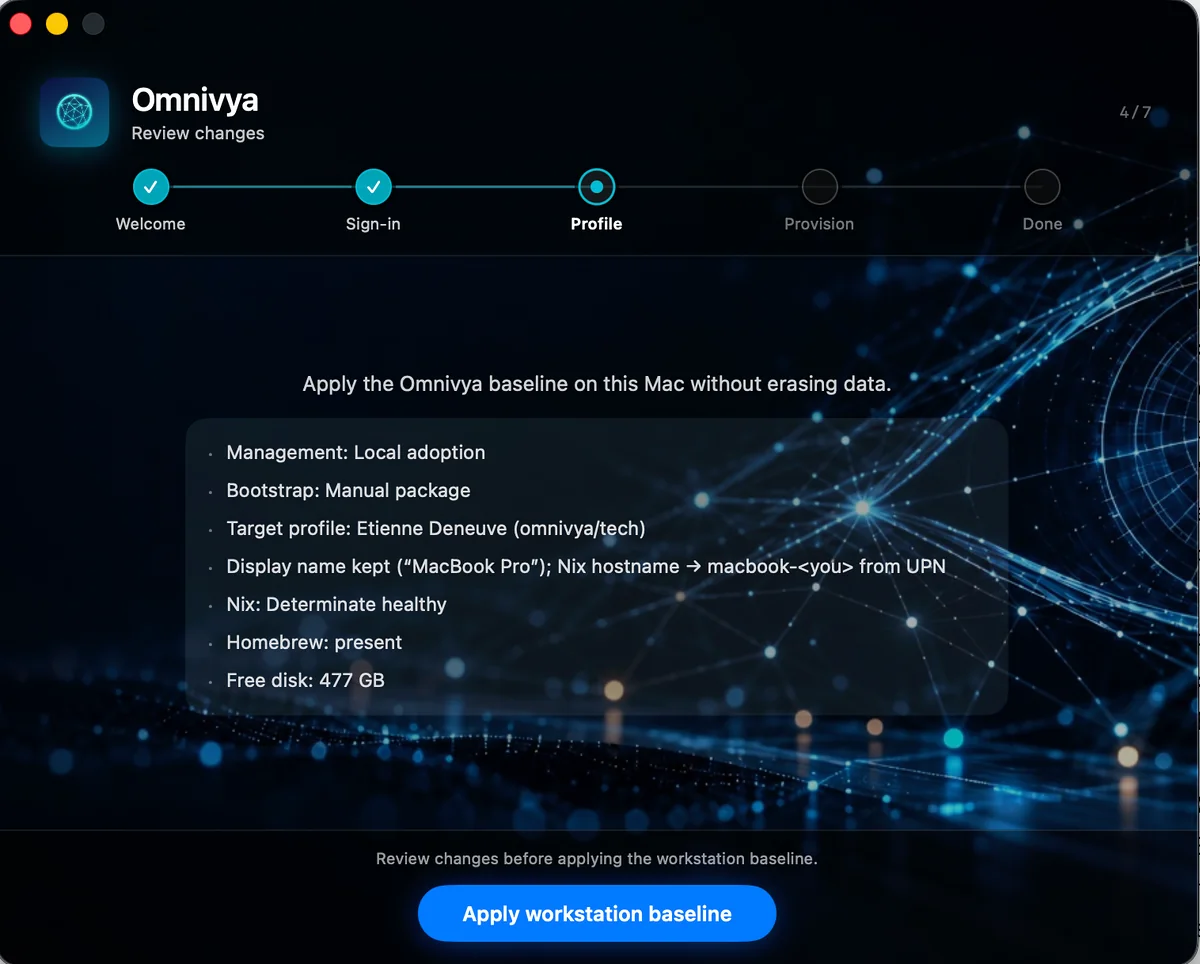
On an already-used Mac, Setup doesn’t start from scratch: it shows the state it found before converging the machine.
Apple Business remains very important in the model#
This isn’t a series on “why I replaced my MDM with Nix.”
I have absolutely no desire to rewrite an MDM.
Apple Business does the enrollment and device-control part very well. I simply want to avoid it also becoming my composition engine, my application inventory, my shell manager, my Nix orchestrator, and my update mechanism.
The workstation is a platform. So I preferred to apply the same principles I use elsewhere: separation of responsibilities, declarative state, explicit identity, versioning, and rollback.
The next question was then fairly natural: if Apple Business no longer chooses the workstation, who does?
In my case, the answer was already in Entra.
Official sources#
Omnivya is the company I co-founded with Taous, and where I serve as CTO. Structured engagements run through it.
For a question or a conversation without a sales brief: Get in touch · LinkedIn